Download Online GST Registation Certificate with Web Online CA

Fill Your all GST Registration details
GST Registration
  • Authorized by Income Tax Department "e-Return Intermediary (ERI)" are entities who are authorized to e-file Income Tax Returns on behalf of taxpayers.
  • Registered with Startup India is duly certified under GOI's Startup India scheme.
  • Supported by iStart (Government of Rajasthan. Initiative for startups).
  • Supporting Government Making India Digital.
  • 40,000+ partners across India, and the number is growing every day.
  • Covering 19,000+ Pincodes Across India.
  • Assistance in e-Verification of the Filed Returns.

  • Central Goods and Services Tax (CGST): This tax is Levied by the Central Government on goods and services sold within a state. It replaces taxes like service tax and central excise.
  • State Goods and Services Tax (SGST): Charged by the State Government on the same intra-state sale. It replaces state taxes like VAT and entertainment tax.
  • Integrated Goods and Services Tax (IGST): Applied by the Central Government on inter-state sales and imports/exports. The amount is shared between Centre and the destination state.
Pricing Summary
  • Web Online CA Fee
    Rs. 1499/-
  • Complete By*
    28-Feb-2026
Documents Required for New GST Registration
  • Pan Card
  • Aadhar Card
  • Photo
  • Latest Electricity Bill
  • Consent Letter (If Electricity Bill Name on Family Member)
  • Rent Agreement (If Business Place is Rented)
  • Current Location Of Business Place (For Find Proper Address)
  • Bank Details (01st Page Photo of Bank Passbook or Cancel Cheque)
Download GST Registration Certificate Online in India

  • By Web Online CA
  • 3 min read
  • Updated On 06-February-2026

A GST registration certificate is valid proof that a business is registered under India’s Goods and Services Tax system. It allows businesses to collect GST from customers and claim input tax credits on their purchases.

Download GST Registration Certificate

To download GST certificate follow the below steps:

Step - 1: Visit the official website and Login with your credentials.

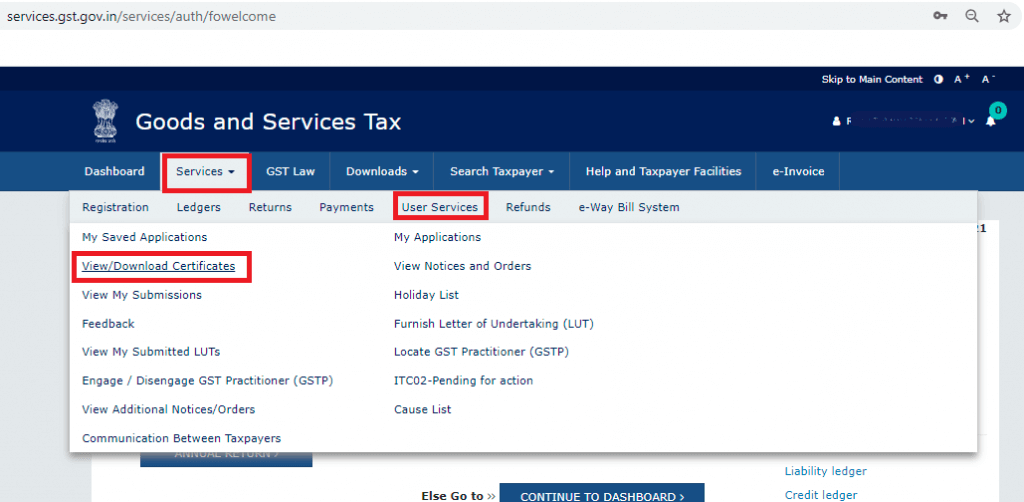
Step - 2: Go to 'Services' -> 'User Services' -> 'View / Download Certificate'. 

GST Certificate download

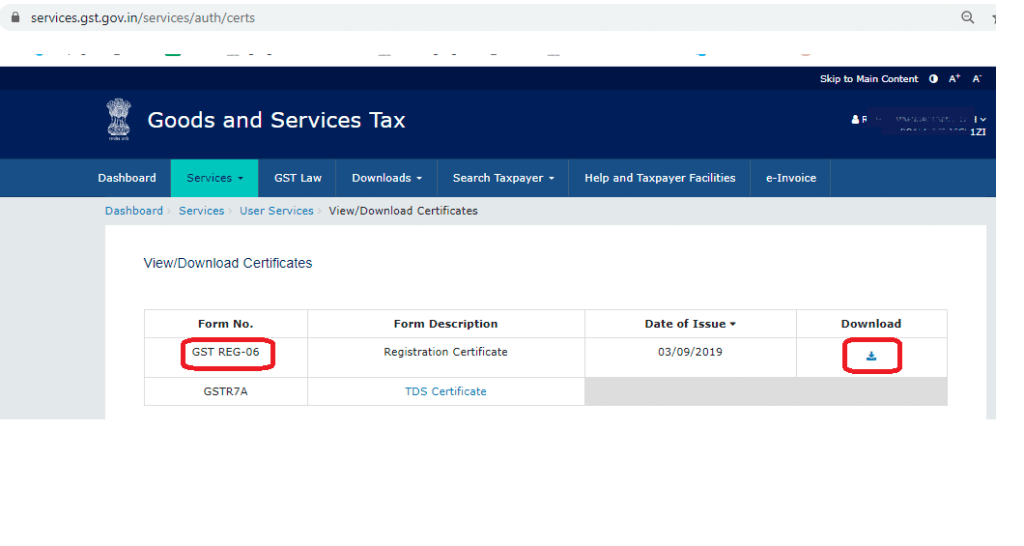
Step - 3: Click on the 'Download' icon.

GST Certificate download

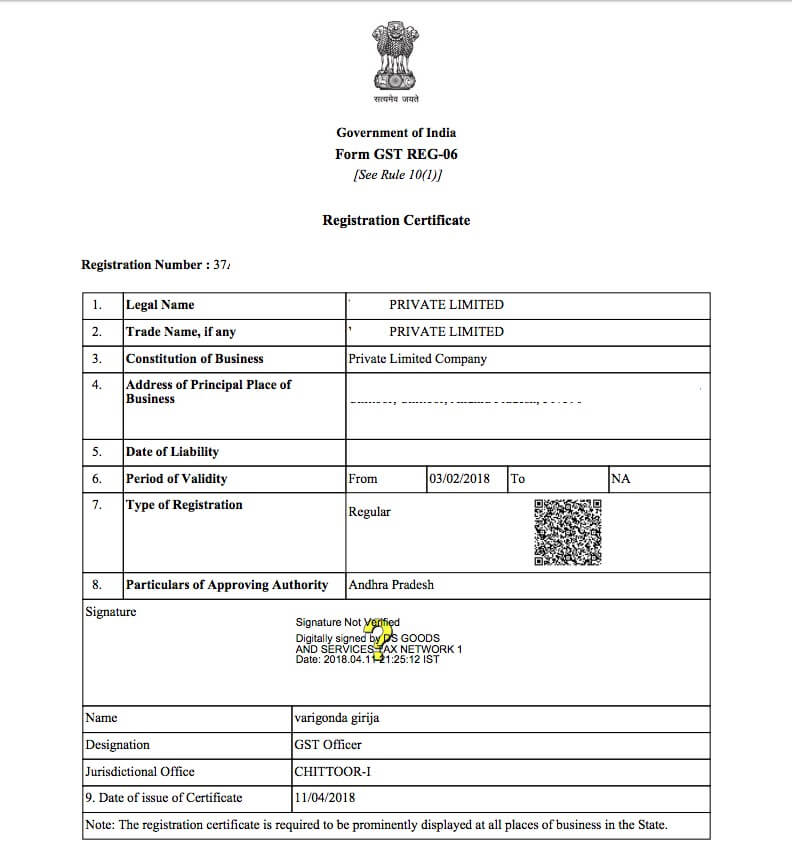
Step - 4: Open the downloaded PDF document and take a printout. 

Sample GST Certificate

Step - 5: Display the printed certificate at your business places.

However, the GST Registration services also available on Web online CA Portal that helps you to get your business GST registered and obtain your GSTIN Certificate.

Time Limit/Validity of the GST Registration Certificate

The GST certificates issued to regular taxpayers do not have an expiry date. Hence, as long as the GST registration is not surrendered or cancelled by GST authority, it would continue to remain valid.

Frequently Asked Questions

No - you must log in to the GST portal with valid username and password to download GST certificate.

If details are incorrect, you must file an amendment application on the GST portal and then download the updated certificate.

No, the GST certificate is digital only. You must download it as a PDF and print it for your records.

The GST Registration Certificate is permanent unless the registration is cancelled, surrendered, or suspended.

Yes, the GSTIN on your certificate is valid for all interstate and intrastate GST compliance.

You can verify your GST Registration Certificate on the GST portal by entering your GSTIN to confirm the registered business details.

No, downloading the GST certificate is free on the official GST portal.